Subnet-Calculator.Pro
Connectors & PoE Standards Guide
This guide covers the essential physical layer standards for Ethernet cabling and power delivery. Understand the T568A and T568B wiring schemes for terminating cables and learn how Power over Ethernet (PoE) can simplify your device deployments.
PoE Power Budget Simulator
Plan your deployment, and the tool will suggest the most efficient switch configuration.
1. Add Devices to Plan
T568A vs. T568B Wiring Standards
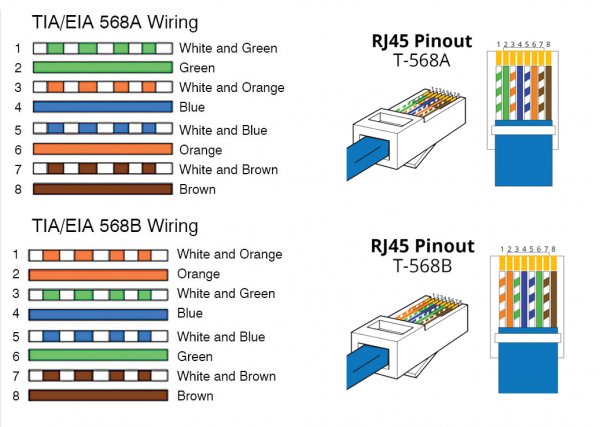
These two standards define the pinout, or order of connections, for the eight wires in a Category 5e, 6, or 6a cable to an RJ45 connector.
The only difference between T568A and T568B is the swap of the green and orange wire pairs (pairs 2 and 3). While functionally identical for connectivity, T568B is the most widely used standard in the United States and for new commercial installations. The most important rule is to use the same standard on both ends of a cable for a "straight-through" connection.
Straight-Through vs. Crossover Cables
The cable type depends on the devices you are connecting.
| Cable Type | Wiring | Traditional Use Case |
|---|---|---|
| Straight-Through | Both ends use the same standard (e.g., T568B to T568B). | Connecting dissimilar devices (e.g., PC to Switch, Router to Switch). |
| Crossover | One end is T568A, the other is T568B. | Connecting similar devices directly (e.g., PC to PC, Switch to Switch). |
The Role of Auto MDI-X
Modern network interface cards (NICs) almost universally support Auto MDI-X (Automatic Medium-Dependent Interface Crossover). This technology automatically detects the required cable connection type (straight-through or crossover) and configures the connection appropriately. Because of Auto MDI-X, dedicated crossover cables are now rarely needed, and you can typically use a standard straight-through cable for nearly all connections.
Power over Ethernet (PoE) Standards
PoE technology allows network cables to carry electrical power to connected devices.
| Standard | IEEE Standard | Max. Power at PSE | Min. Power at PD | Common Devices |
|---|---|---|---|---|
| PoE | 802.3af | 15.4 W | 12.95 W | VoIP phones, basic security cameras, simple access points. |
| PoE+ | 802.3at | 30 W | 25.5 W | Pan-Tilt-Zoom (PTZ) cameras, multi-radio access points, video phones. |
| PoE++ (Type 3) | 802.3bt | 60 W | 51 W | Video conferencing systems, high-performance WAPs. |
| PoE++ (Type 4) | 802.3bt | 100 W | 71.3 W | Laptops, small network switches, digital signage. |
A Professional Guide to Ethernet Wiring and Power over Ethernet (PoE)
Mastering the physical layer of networking is essential for building reliable and high-performance networks. This guide provides a detailed look at the foundational standards for Ethernet cabling—T568A and T568B—and explores the transformative technology of Power over Ethernet (PoE). Whether you're terminating a cable or designing a deployment of IP cameras and access points, this information is critical for success.
T568A vs. T568B: Understanding the Standards
The T568A and T568B standards define the pinout, or the specific arrangement of the eight individual wires within a twisted-pair Ethernet cable, into an RJ45 connector. While they seem complex, the only practical difference between them is the swapping of the orange and green wire pairs. This simple swap, however, has important implications for cable types and network compatibility.
The Color Codes Explained
An Ethernet cable contains four twisted pairs of wires, for a total of eight wires. Each pair consists of a solid-colored wire and a corresponding white wire with a stripe of the same color.
| Pin | T568A Standard | T568B Standard (Most Common) | Pair & Function (for 10/100BASE-T) |
|---|---|---|---|
| 1 | White/Green | White/Orange | Pair 2 / Transmit+ |
| 2 | Green | Orange | Pair 2 / Transmit- |
| 3 | White/Orange | White/Green | Pair 3 / Receive+ |
| 4 | Blue | Blue | Pair 1 / Unused |
| 5 | White/Blue | White/Blue | Pair 1 / Unused |
| 6 | Orange | Green | Pair 3 / Receive- |
| 7 | Brown | Brown | Pair 4 / Unused |
| 8 | White/Brown | White/Brown | Pair 4 / Unused |
For Gigabit Ethernet (1000BASE-T) and faster, all four pairs are used for simultaneous bidirectional data transmission.
Which Standard Should You Use?
T568B is the dominant standard in the United States and for new commercial data cabling installations worldwide. For consistency and to avoid confusion, it is best practice to use the T568B standard for all new network cabling projects unless you are required to match an existing T568A installation.
The most critical rule is consistency. A straight-through cable, the most common type of Ethernet cable, must have the same standard on both ends. Mixing standards (T568A on one end and T568B on the other) creates a crossover cable, which has a very specific and increasingly rare use case.
Power over Ethernet (PoE): Simplifying Deployments
Power over Ethernet is a game-changing technology that enables the delivery of low-voltage electrical power along with data over standard twisted-pair Ethernet cabling. This eliminates the need for a separate power outlet and AC adapter for powered devices, drastically simplifying installation, reducing costs, and allowing for more flexible placement of network equipment.
How PoE Works
A PoE system consists of two main components:
- Power Sourcing Equipment (PSE): This is the device that provides the power. It is typically a PoE-enabled network switch or a midspan power injector.
- Powered Device (PD): This is the device that receives power from the Ethernet cable, such as a VoIP phone or an IP camera.
Before any power is delivered, the PSE and PD perform a negotiation or "handshake" process. The PSE sends a small, low-voltage signal to the device to detect whether it is a PoE-capable PD. This ensures that power is never sent to a non-PoE device, making it safe to plug any device into a PoE port.
The Evolution of PoE Standards
As device power requirements have grown, the IEEE has ratified several standards to deliver more power.
| Standard Name | IEEE Standard | Max. Power at PSE | Min. Power at PD | Common Use Cases |
|---|---|---|---|---|
| PoE | 802.3af | 15.4 W | 12.95 W | VoIP phones, basic security cameras, simple access points. |
| PoE+ | 802.3at | 30 W | 25.5 W | Pan-Tilt-Zoom (PTZ) cameras, multi-radio wireless access points, video phones. |
| PoE++ (Type 3) | 802.3bt | 60 W | 51 W | Video conferencing systems, high-performance WAPs. |
| PoE++ (Type 4) | 802.3bt | 100 W | 71.3 W | Laptops, small network switches, digital signage. |
The difference between the power supplied by the PSE and the power available at the PD accounts for power lost as heat over the length of the cable.
Planning a PoE Power Budget
One of the most critical aspects of designing a PoE network is managing the switch's power budget. Every PoE switch has a maximum total amount of power it can supply across all of its ports simultaneously.
- Find the Total Budget: Check the manufacturer's datasheet for your switch model. This will be listed in Watts (W) (e.g., 180W, 370W).
- List Your Devices: List every PoE device you plan to connect and find its maximum power consumption, also in Watts. This is found on the device's datasheet.
- Sum the Power Requirements: Add up the maximum power consumption of all your devices.
- Ensure a Margin of Safety: The total power consumption of your devices should not exceed the switch's total PoE budget. It is a best practice to leave a safety margin of 15-20% to account for peak usage and future expansion.
For any business deployment, carefully calculating the PoE budget is essential. Overloading a switch can lead to unstable device operation and random shutdowns. Using our PoE Power Budget Simulator can help you plan your deployment and prevent these issues before they occur. Always consult device datasheets for the most accurate power consumption figures.
Frequently Asked Questions about Connectors and PoE
What is the difference between T568A and T568B?
The only difference between T568A and T568B wiring standards is that the green and orange wire pairs are swapped. T568B is the most common standard used in the United States and for new commercial network installations. The most important rule is to use the same standard on both ends of a cable for a straight-through connection.
Should I use T568A or T568B?
For new installations, T568B is the dominant standard and the recommended choice for consistency. If you are working on an existing network, you should check the existing terminations and maintain consistency with the standard already in use.
What is a straight-through cable?
A straight-through cable is an Ethernet cable that has both ends terminated with the same wiring standard (e.g., T568B on both ends). This is the standard cable type used for connecting dissimilar devices, such as a computer to a switch or a switch to a router.
What is a crossover cable?
A crossover cable has one end terminated with the T568A standard and the other end with T568B. It was traditionally used to connect similar devices directly, like a PC to a PC or a switch to a switch. However, modern devices with Auto MDI-X have made dedicated crossover cables largely obsolete.
What is Power over Ethernet (PoE)?
Power over Ethernet (PoE) is a technology that allows network cables to carry both data and electrical power to connected devices. This eliminates the need for a separate power adapter for devices like IP phones, wireless access points, and security cameras.
What is the difference between PoE, PoE+, and PoE++?
The main difference is the maximum amount of power they can supply per port. Standard PoE (802.3af) provides up to 15.4W. PoE+ (802.3at) provides up to 30W. PoE++ (802.3bt) comes in two types: Type 3 provides up to 60W, and Type 4 provides up to 100W.
What kind of cable do I need for PoE?
For standard PoE and PoE+, Category 5e (Cat5e) or better cable is generally sufficient. For higher-power PoE++ standards, it is highly recommended to use Category 6a (Cat6a) or better shielded cable to ensure better performance and heat dissipation.
How do I use the PoE power budget calculator?
Set your switch's PoE standard and total power budget (in Watts). Then, add each device you plan to connect by selecting its type or entering its custom power draw. The tool will calculate the total power consumed and show you if you have exceeded your switch's budget.
Where do I find my switch's total power budget?
The total PoE power budget is a specification provided by the switch manufacturer. You can find it on the product's datasheet, in the technical specifications on the manufacturer's website, or sometimes printed on the device itself.
Can I connect a non-PoE device to a PoE switch?
Yes, it is safe to connect a non-PoE device (like a computer or printer) to a PoE switch port. PoE switches are intelligent; they perform a handshake process to detect if a connected device is PoE-capable before sending any power. If the device does not request power, the switch will only send data.
What happens if I exceed my switch's PoE budget?
If the total power drawn by connected devices exceeds the switch's total PoE budget, the switch will typically deny power to the last-connected or lowest-priority devices. This can lead to devices not turning on or randomly shutting down. It's crucial to plan your budget carefully.
What is the 568B wire color order?
The T568B wiring standard for an RJ45 connector, from pin 1 to 8, is: Orange/White, Orange, Green/White, Blue, Blue/White, Green, Brown/White, Brown.
What is an RJ45 connector?
An RJ45 connector is the standard modular connector used for terminating twisted-pair Ethernet cables. It has 8 pins to which the 8 individual wires of the cable are connected.
What is a PoE injector?
A PoE injector is a device used to add power to an Ethernet cable for a single device. It's used when you need to power a PoE device but your network switch does not support PoE. The injector is placed between the non-PoE switch and the PoE device.
Which devices commonly use PoE?
Common devices that use PoE include VoIP phones, wireless access points (WAPs), IP security cameras, IP intercom systems, and some small network switches or IoT devices.
How far can PoE transmit power?
PoE can transmit power over the same maximum distance as an Ethernet data signal, which is 100 meters (or 328 feet). For longer distances, PoE extenders may be required.
What is a PoE splitter?
A PoE splitter is used at the device end of a cable. It takes in a PoE signal (data and power) and splits it into two separate outputs: a standard Ethernet data connection and a separate power connection (e.g., a DC barrel jack). This allows you to power a non-PoE device using a PoE connection.
Are T568A and T568B electrically the same?
Yes, from a connectivity standpoint, both standards are electrically the same. The pairs are just arranged differently. As long as you use the same standard on both ends for a straight-through cable, the connection will work.
Why is it important to maintain the twists in the wires?
The twists in each pair of wires in an Ethernet cable are crucial for canceling out electromagnetic interference (EMI) and crosstalk from adjacent pairs. You should maintain the twists as close to the termination point as possible (typically within 1/2 inch or 13 mm) to ensure the cable performs at its rated category.
What are pins 4, 5, 7, and 8 used for in PoE?
In older PoE standards (Mode A), power is sent on the same pairs as data (pins 1, 2, 3, and 6). In Mode B, power is sent on the spare pairs (pins 4, 5, 7, and 8). In modern high-power PoE+ and PoE++ standards (4PPoE), all four pairs are used to deliver power, which is why higher quality cabling is important.
Can I make my own crossover cable?
Yes, you can make a crossover cable by terminating one end with the T568A color code and the other end with the T568B color code. However, due to Auto MDI-X on modern devices, the need for crossover cables is extremely rare.
What is a power margin in a PoE budget?
A power margin is the difference between the switch's total PoE budget and the total power consumed by all connected devices. It is best practice to leave a healthy power margin (e.g., 15-20%) to account for potential power fluctuations and to allow for future device additions without overloading the switch.
Does PoE affect network speed?
No, Power over Ethernet is designed to have no impact on the network's data transmission speed or performance. The power and data signals are transmitted in a way that does not interfere with each other.
Is professional help needed for network cabling?
For small home networks, DIY cabling is common. However, for any business, commercial, or large-scale installation, it is highly recommended to use a professional and certified low-voltage or network cabling installer. Professionals ensure that all cables are properly terminated, tested, and certified to meet performance standards, which is crucial for a reliable network.